Welcome To Softfreelk

BlueStacks App Player download here!

BLUESTACKS
BlueStacks App Player
BlueStacks HD App Player Pro is a plateform that allows you to run applications, including games written for OS Android – on desktops, laptops and tablets and also this package contains all files to install it offline. This is a special program that uses a technology called LayerCake, which provides the correct environment for running applications for ARM-Android on a computer running Windows. Get Root.
After you install BlueStacks on your Windows PC, you can download directly from the program needed Android-app, without having to use the Android-based smartphone. BlueStacks looks pretty neat and fits naturally into the interface Windows.
Features
  • Run Android applications in full-screen and not only.
  • Through the cloud download your application from the phone to Windows.
  • In 16 player preinstalled applications and you can play them if there is no number.
  • Ability to set an unlimited number of applications.
  • Ability to play 3D games (cache).
  • You can set a home screen (Launcher) to replace the standard, etc.
  • Sync with your Android device will allow you to make calls, send SMS, take pictures and more.
  • Has a lot of settings and system settings Android (Although they are slightly trimmed)
  • Knows how to install applications from a computer at the touch of them
  • Ability to obtain Root (full access to the file system, etc.)
  • You can set Google Play, simply speaking market.
  • BlueStacks great friends with ADB is a very big plus, if you really want, you can change the firmware.
  • Ability to turn in FastBoot and Recovery.
  • BluesStacks has virtual disk, such as SD Card, Data, and a few others. Which again gives you the opportunity to do a lot of “body” motions with it and enjoy all its charms.
  • Ability to obtain Root (full access to the file system)
http://www.bluestacks.com/app-player.html

iWisoft Free Video Converter Download Here!


iWisoft Free Video Converter is a powerful, high-quality freeware video converter.

It can easily convert video/audio between all popular formats. It can convert video/audio from one format to another, rip audio from video, convert video to image series, animated gif.

The free video converter provides you optimized output profiles, you can easily convert video/audio for iPod, iPhone, PSP, Zune and many other digital devices.

You can adjust codec, bit rate, frame rate, video size, audio channel, sample rate, audio volume etc. for an output format.

And the video converter provides many useful video editing functions, like cropping, trimming, merging, adding watermark, subtitle etc.
 

Key Features

Convert all popular video formats, including HD video.
Rip audio from video.
Convert video to animated GIF.
Optimized profiles for many digital devices.
Adjust format parameters.
Merge video.
Trim video.
Crop video.
Add watermark on video.
Support .srt subtitle.
And many more...


http://www.iwisoft.com/videoconverter/download-video-converter.php
for more info>>>click here

Total Video Converter Platinum 7.1.8 Crack is Here!


Total Video Converter Platinum
Total Video Convertor can convert any
video to 3D formats easily. It offers up to 14 types of 3D modes
including Anaglyph 3D (10 types), Side By Side (Half-Width/Full) 3D, Top
and Bottom (Half-Height/Full) 3D. Most Media Player software like
Window Media Player only supports video formats like AVI, MP4, WMV, etc.
To play any video file on your media players, just convert it to
video/audio formats compatible with your media player. It can convert
all video files to iPod, iPhone, iPad, Apple TV, Samsung Galaxy S4,
Samsung Galaxy Note 2, HTC One, PSP, PS3, Xbox360, Sony Xperia, etc.
This comprehensive and powerful piece of
video conversion software can convert any audio format or extract audio
track from video to AAC, AC3, AIFF, AMR, AU, FLAC, MP3, M4V, MP2, OGG,
WAV, WMA audio formats. It can convert video and audio files in batches
and  you are able to convert several files to different formats with
only one conversion.
 Features of Total Video Convertor

  • Video effect modifier - You
    can get your desired video quality by modifying video Brightness,
    Contrast, Saturation, Hue and Volume. Also this total video converter
    owns the technique to eliminate some jaggedness from the interlaced
    video for better viewing.
  • Video cutter - Aiseesoft
    Total Video Converter possesses “Trim” function to help you cut a clip
    from the original video. You can set the “Start Time” and “End Time” to
    define the segment.
  • Video cropper - The
    Video conversion software allows you to adjust video playing area. You
    can also select the aspect ratio to extrude your video slightly.
  • Video Merger - It enables you to merge multiple videos into one video.
  • Watermark - With this
    professional video converter, adding a text or image watermark to your
    video will be a very easy thing. You can adjust its size, font, color,
    position and transparency.
  • Create different movies and music quality - You
    can define video settings, such as Video Encoder, Frame Rate, Video
    Bitrate, Resolution, and audio settings, including Audio Encoder, Sample
    Rate, Channels, Audio Bitrate. As for the Resolution, if you don’t find
    what you want, you are available to input your own resolution in
    Width(pixels) * Height(pixels). All the settings can be saved in the
    option list of “User-Defined”.
  • Select audio track and subtitle - It supplies you with audio track and subtitle choice. You can choose any audio track and subtitle for the output video.
  • Preview and Snapshot - With
    Aiseesoft Total Video Converter, you can preview the original video and
    output video effect. Once you get one desired movie scene, you can take
    a snapshot and save it as a picture.
  • Highest conversion speed - It
    can provide you with super fast conversion speed with the NVIDIA® CUDA™
    and AMD APP acceleration technology, and it completely supports
    multi-core processor.
  • User-friendly graphical interface - It offers you an entirely new “Profile” control, thumbnail in the video lists and adjustable window to fit for your screen.
How to activate it?

  1. Download the setup of total video convertor
  2. Run the setup and don’t launch it
  3. Copy the Crack  folder Content and paste it to the Software
    Installed directory. (C:\Program Files\Aiseesoft Studio\Aiseesoft Total
    Video Converter Platinum)
  4. A Pop-up will appear saying existing file, Just replace the file.
  5. Done.. Enjoy..!! 


Screenshot


Downloads

Official Home Page

Total Video Converter Platinum v7.1.8 (31.88 MB) / Mirrors

 Total Video Converter Platinum Crack only (170.7 KB) / Mirrors


Feel free to give your suggestions and comments.

Adobe Photoshop Express v2.3.273 Apk is Here ! [LA...


Adobe Photoshop Express Premium v2.3.273


On-the-go photo editing was never so
fun, fast, and cool. Touch your way to better-looking pictures with
automatic fixes and filters. Get your pictures to pop! And after
sharing, you’ll be the talk of your friends. 


Features of Adobe Photoshop Express Premium v2.3.273


  • Basics: Crop, straighten, rotate, and flip your photos. Remove red eye, and pet eye.
  • Auto-Fix: A one-touch adjustment for contrast, exposure, and white balance.
  • Blemish Removal: With one touch, remove spots, dirt, and dust from your photos.
  • Color: Slide controls for clarity, contrast, exposure, highlights, shadows, temperature, tint, sharpen and vibrance.
  • One-touch filters “Looks”: Choose from more than 20 eye-catching effects! And now control the intensity of Looks.
  • New image rendering engine improves performance and enables handling of large file sizes – i.e. panoramic photos.
  • Borders: Add a distinctive personal touch to your photos with 15 borders and frames. Express yourself!
  • RAW photo support: Import and edit photos in RAW format.
  • Share to all your favourite social sites: Facebook, Twitter, Tumblr, Adobe Revel and more.
  • One place for all your photos: Upload your photos to private albums
    in Revel to view and share memories across devices. Upgrade to Revel
    Premium after 30 days to get unlimited photo & video imports – just
    $5.99/month.
  • Add the Premium Looks pack to give your photos fun, fresh looks with 20 new one-touch filters.
  • What’s New in Adobe Photoshop Express Premium v2.3.273
  • Blemish Removal
  • Defog to remove fog and haze
  • Import RAW photos
  • Control the intensity of Looks
  • Bug fixes and performance improvements
Screenshot


Adobe-Photoshop-Express-Premium-Apk-1


Downloads


Adobe Photoshop Express Premium v2.3.273 (38 MB) / Mirrors


Feel free to give your suggestions and comments.

CrazyTalk Animator 2 Download Here!


CrazyTalk Animator provides an exciting new approach to traditional 2D animation with innovative new tools that allow users to apply 3D motions to 2D characters. New powerful tools have opened new possibilities for freely editing 2D motions and viewing them from any angle with a single click. Combined with functional features like facial puppet and auto lip-sync, it has become the most creative software for 2D character animation.

Windows Edition

  • Version: 2.11
  • Platform: Win XP SP2 / Vista / 7 / 8
  • Release Date: 2014-05-13
  • Category: Trial Software
    (Pipeline trial edition; 15 days)
  • File Size:
    Pipeline Trial - 217 MB
  • Resource Pack - 74.9 MB 
     
    http://www.reallusion.com/images/download/BT_Download_PC.jpg

Mac Edition

  • Version: 2.11
  • Platform: OS X v10.7 or later
  • Release Date: 2014-05-13
  • Category: Trial Software
    (Pipeline trial edition; 15 days)
  • File Size:
  • Pipeline Trial - 135 MB
    Resource Pack - 67.9 MB 

The Top 25 Fun Google Tricks

Maybe to help dispel the wacky notion that geeks are boring, or maybe to prove that Search isn’t all work and no play and Sergei and Larry are by no means dull boys, Google every-once-in-a-Google-Moon leavens their spam-fighting and user experience-enhancing with some honest-to-goodness, good clean Fun Google Tricks. You probably know a few of these memes already — passed around the intarwebz ad infinitum as they often are — those quirky little tricks and pranks you never thought you’d see from such a serious search engine. Occasionally, we searchers stumble upon some quietly placed “Google Easter Egg,” or sometimes Google’s PR peeps publicize some brand spanking new Fun Google trick that spices up the user experience as much as it enhances it. Whichever it is, these Google Tricks are fun darnit, so have fun with them. Meme junkies and time-wasters that we are here at Google Tricks, we’ve had our fair share of good times. And because we’re not greedy, and because we like to organize as a way to procrastinate, we’ve done the heavy lifting of gathering what we consider to be the Top 25 Fun Google tricks right here in one glorious and easy-to-read location on this page. If you like the cut of our jib, perhaps you’d be so kind as to like us on the you-know-what-book, or add a one to our G+ thingie. We’d be so happy and thankful if you did.
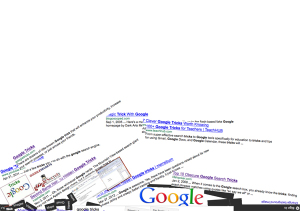

funny google gravity trick1. Google Gravity Quite simply, this is Earth-bound
physics “infused” into Google’s interface: with “gravity,” the visual elements you commonly find on the interface, such as the search bar, the “I’m feeing lucky” button, and everything else fall down like a stack of bricks on the bottom of the browser. You can even “pick up” and “throw” the search results at the “walls” or just simply mess with them. This is no longer implemented on Google, but you can still see how it worked through the link below.   2. Let me Google that for you LMGTFY or Let Me Google That for You is a somewhat tongue-in-cheek service made for those of us who are too lazy to use Google. Upon entering a search query, instead of results, you get a link that you can then mail to your lazy recipient. Clicking on the link launches the actual search: thus, in this perigrinatory manner, you have Googled it for them. All they have to do is click the link. A beautiful example of technology making things more complicated for us. 3. Google Chuck Norris There was a time when the internet raged with all imaginable Chuck Norris jokes. So naturally, Google itself dipped its hand in the meme with the Chuck Norris Google Trick. Search “Chuck Norris,” and Google returns a familiar Chuck Norris joke: “Google won’t search for Chuck Norris because it knows you don’t find Chuck Norris, he finds you.” 4. God on Google Earth Sometime in 2010, people around the world went “God crazy” when Google Earth supposedly had taken a “snapshot” of “divine beings” while crossing a mountain zone in Switzerland. There’s no definite answer, of course, but the buzz it created was testament to how the entire online community could get excited over a blurry photo, like they do with pictures of cats. 5. Google Pac-man A treasure-trove of fun Google tricks won’t be complete without mentioning Google’s Pac-Man doodle. On May 22, 2010, the 30th anniversary of the classic game, people around the world woke up to a search engine sporting an actually playable mini-version of Pac-Man. And naturally, hundreds of millions of people spent hours playing the game, basically slowing down productivity to a halt. 6. Google Mirror This fun Google trick simply displays a mirror image of everything you might see when doing a search on Google.    
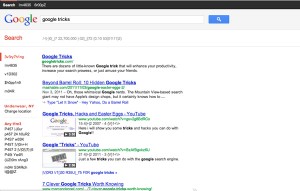
7. Google Hacker Those who are familiar with the so-called language of hackers (1337 5p3@k or “leet speak”) may love using this Google trick to amuse haxor pals or confound the squares. Sure, the trick isn’t much trickier than  swapping letters for moderately analogous numbers or ASCII characters — e.g. “G” becomes “6″, “E” becomes “3″, “N” becomes “||”, etc — But it’s still fun symbol-play, and still somehow feels like a secret language, despite that we all now w00t every time we are overcome with joy.   8. Google Barrel Roll A Fun Google trick that is still accessible today, the barrel roll means exactly as it says: make Google do a barrel roll. Simply type “Do a barrel roll” into the search bar and Google dutifully obeys. Warning: This Especially Fun Google Trick is known to make babies cry and grown men squeal with delight
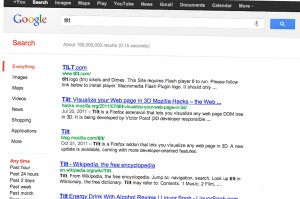
9. Google Rainbow Like a handful of the other Fun Google Tricks included in this list, this third-party website that has no official affiliation with Google but only offers its two cents in letting people experience the search engine in a delightful way. If you like colors, this site delivers it—although it may remind you more of the internet circa early-1990s, with all its animated GIFs. 10. Google Sphere Google Sphere turns every little element you commonly see on Google’s homepage into a swirling “sphere.” It’s pretty cool, but it’s no longer implemented on Google. To see how it once worked, just visit the link below. 11. Google Spam Probably not an actual Google trick but more a manifestation of how Google offers users related information. In the folders in your Gmail account, you usually see a one-line text advertisement from Adsense. But in the Spam folder, what you’ll see is a real Spam recipe—yes, it’s a recipe for something you can actually eat. google askew12. Google Tilt or Askew Typing the word “tilt” or “askew” on Google (specifically if you’re using the Chrome or Safari browser) commands the search engine to “tilt” the whole screen slightly to the right. 13. Dragon Slayer Those who use Google Docs will find this mildly amusing. If you create or open any spreadsheet, pressing Shift+F12 pops up a message that says: “Dragon slain! Congratulations, you’ve slain the dragon! ]B=8}”. 14. Google Ninja Who doesn’t love ninjas? Google definitely does. If you’re using your Google Reader feed, press the keys “up, up, down, down, left, right, left, right, B, A” and a ninja (or a couple of them) appear! 15. All the Google Doodles Over the years, Google has released several of its “doodles”—a temporary re-design of the Google logo made as a tribute to a historical event or the birthday of someone who has changed the world for the better. Through the link below, you’ll find all of the Google Doodles, not only the American versions. 16. Recursion Type “recursion” into the Google search bar and Google in return asks, rather recursively: “Did you mean recursion?” 17. Google’s Nessie Use the beach theme with your iGoogle homepage, then very patiently sit there and wait until the clock strikes 3:14 AM. Or you can just more the clock forward and see the monster” that comes out. If you actually waited several hours until 3:14 AM, finally seeing the monster might not totally amuse you. 18. Flight Simulator What started as an Easter egg became so well-loved that Google eventually turned it into a regular feature of Google Earth. Just click Tools > Enter Flight Simulator, and you’re off to make a round-the-world tour. It would have been more awesome if Google Earth also has a “rocket launcher” feature with unlimited ammo to go with it, but maybe next time. 19. Google MentalPlex One of the earliest (if not, the earliest) Google April Fool’s joke (this one surfaced in 2000) is the Google MentalPlex. Instead of typing their queries into the search bar, unwitting users were “invited” to just “think” their questions while gazing intently into the MentalPlex circle (apparently to allow Google enough time to “read” your brain signals and transform them into actual search engine queries), then click into the circle to see the results. Even Google’s CEO and co-founder Larry Page called MentalPlex “a quantum leap in finding what you are looking for on the Internet. Typing in queries is so 1999.” It was fun. Especially if you remember that this was the early days of Google, long before the billion-dollar behemoth called Adsense and what-have-you. 20. Google Anagram Step 1: Type “anagram” into the Google search bar. Step 2: Google asks if you in fact mean “nag a ram.” Step 3: Proceed to LOL. 21. The disappearing “OO” This is not really a Google fun trick per se, but you can wow your clueless friend with this little “magic.” Click anywhere on the white space of the Dark Arts page (URL in linked title above), then pretend to rub your two fingers on the two OO’s on the Google logo for 2 to 3 seconds, and the O’s will vanish. To bring it back, do the same thing: Click anywhere again and the OO’s will reappear, after which you will be redirected to the real Google. 22. Annoying Google The “Annoying Google” trick is not really annoying under normal circumstances. Even if you’re in a hurry, Annoying Google’s way of messing up the words as you type them (randomly changing from upper-case to lower-case) is not really annoying. But if you want to see this in action and determine for yourself if it’s really annoying or simply mildly amusing, visit the link below. 23. Epic Google Epic Google is Google on steroids — not the enhanced performance however, just the obscene bulk. Once the page loads, the logo, search bar, “Search” and “I’m Feeling Excessive” buttons, all swell until they either float off the page or you type a search and get the heck outta there. 24. Weenie Google Weenie Google is the flip side of Epic Google. Once the page loads, the logo, search bar, “Search” and “I’m Feeling Inadequate” buttons,immediately begin to shrink to inscrutable and barely-usable sizes. Is fun, no? 25. Chicken Rolling “Rick-rolling” is a popular prank that involves redirecting the unwitting user to a video of music artist Rick Astley singing one of his hit songs (most often “Never Gonna Give You Up”). Chicken-rolling, on the other hand, is like Rick-rolling, but with one dancing man eating fried chicken legs. To subject your unwitting friend to this prank, type the code “2204355” then click “I’m feeling lucky.” See what happens. Whew. What a lot of fun that list provides.
from http://googletricks.com

How to Unblock Any Site Blocked in your Country ?

Internet Censorship
Internet censorship is the control or suppression of what can be accessed, published, or viewed on the Internet. It may be carried out by governments or by private organizations at the behest of government, regulators, or on their own initiative. Individuals and organizations may engage in self-censorship for moral, religious, or business reasons, to conform to societal norms, due to intimidation, or out of fear of legal or other consequences.
Also there is an internet slang for these countries – “Internet Enemies”
So lets start. In this article we are going to show you few methods (practically the best ones) to unblock almost any web site blocked in your country. Choose the best one for you.

Ultrasurf
good : can unblock any site in any country, almost 100% internet speed,totally free
bad : nothing 
how to use 
  1. Download Ultra Surf  [Download Ultra Surf]
  2. No need of installation.Extract and run the exe file
  3. Choose the server which has the best speed
  4. Done check your IP to make sure you are unblocked
Unblock Sites
good : can unblock any site in any country, almost 100% internet speed,totally free
bad : nothing
how to use 
  1. go this web site [Click Here]
  2. enter the url of the web site you want to be unlocked
  3. Click Go ! and you are good to go
Google DNS, Open DNS
good : 100% internet speed,totally free
bad : cannot unblock web sites in some countries, not easy to switch on and off
how to use : Google DNS / Open DNS
Tor Browser
good : bullet proof (this is the best solution for internet anonymity,no one can find you), can unblock any web stuff
bad : slow speed, need a separate browser called Tor Browser
how to use : download Tor Browser and Use [Download Tor Browser]
post your results below so everybody can know the best method

Search

Subscribe via SMS

Subscribe via SMS

Like us

Followers

world clock

Categories

Flash Labels bysoftfree

Popular Posts

Total Hitz

Website counter
Flag Counter

Blog Archive